If Binance has rejected your ID twice, the cause is usually still the one named in the first rejection message. The retry steps below come first; the second-exchange option at the end is for cases where they genuinely don't work.
Switching exchanges without fixing the underlying document or photo issue usually just reproduces the same rejection somewhere else, because the problem lies in the submission itself, not in which exchange is reviewing it.
If you have not yet read our full KYC documents guide, start there — it covers document-by-document requirements, common rejection reasons, and photo technique in more depth than this page repeats. This guide picks up specifically at the point where a reader has already tried that advice and is still stuck. If the problem is actually with registration itself rather than identity verification, our registration failed guide covers that earlier stage instead.
What one rejection usually means
A single rejection is common, and it is not a sign that verification has permanently failed. Binance's rejection messages usually name a specific, fixable reason — glare on the document, a cropped edge, a name that does not match, an expired ID — and resubmitting without addressing that specific reason is the most common cause of a second rejection that looks identical to the first.
It helps to separate two very different situations that both feel the same in the moment: a rejection caused by something fixable in the next five minutes (poor lighting, a cropped corner, a typo in the name field), and a rejection caused by something that needs a different document entirely (an expired ID, a document type not on your country's accepted list). Reading the specific rejection message tells you which category you are in, and that distinction determines whether your next attempt should be a quick retake or a trip to find your passport.
Exhausting the Binance retry path properly
Re-read the specific rejection reason
Do not assume it is a generic failure — the app almost always names the actual problem, whether that is document glare, a cropped corner, or a name mismatch.
Fix that one thing, and nothing else
Retake the photo with better lighting if it flagged glare; correct the name field if it flagged a mismatch. Changing unrelated things "just in case" makes it harder to know what actually fixed it.
Try the alternative document if your primary one keeps failing
A passport often clears faster than a worn or damaged CNIC or National ID — our KYC documents guide covers which alternative applies in Pakistan, Kenya and India.
Retry the liveness check in genuinely different conditions
Move to a well-lit room near a window, remove glasses and any face covering, and follow the on-screen prompt slowly rather than quickly.
Contact Binance support if it still fails after a real second attempt
Support staff can look at your actual submission and sometimes spot an issue the rejection message did not clearly explain.
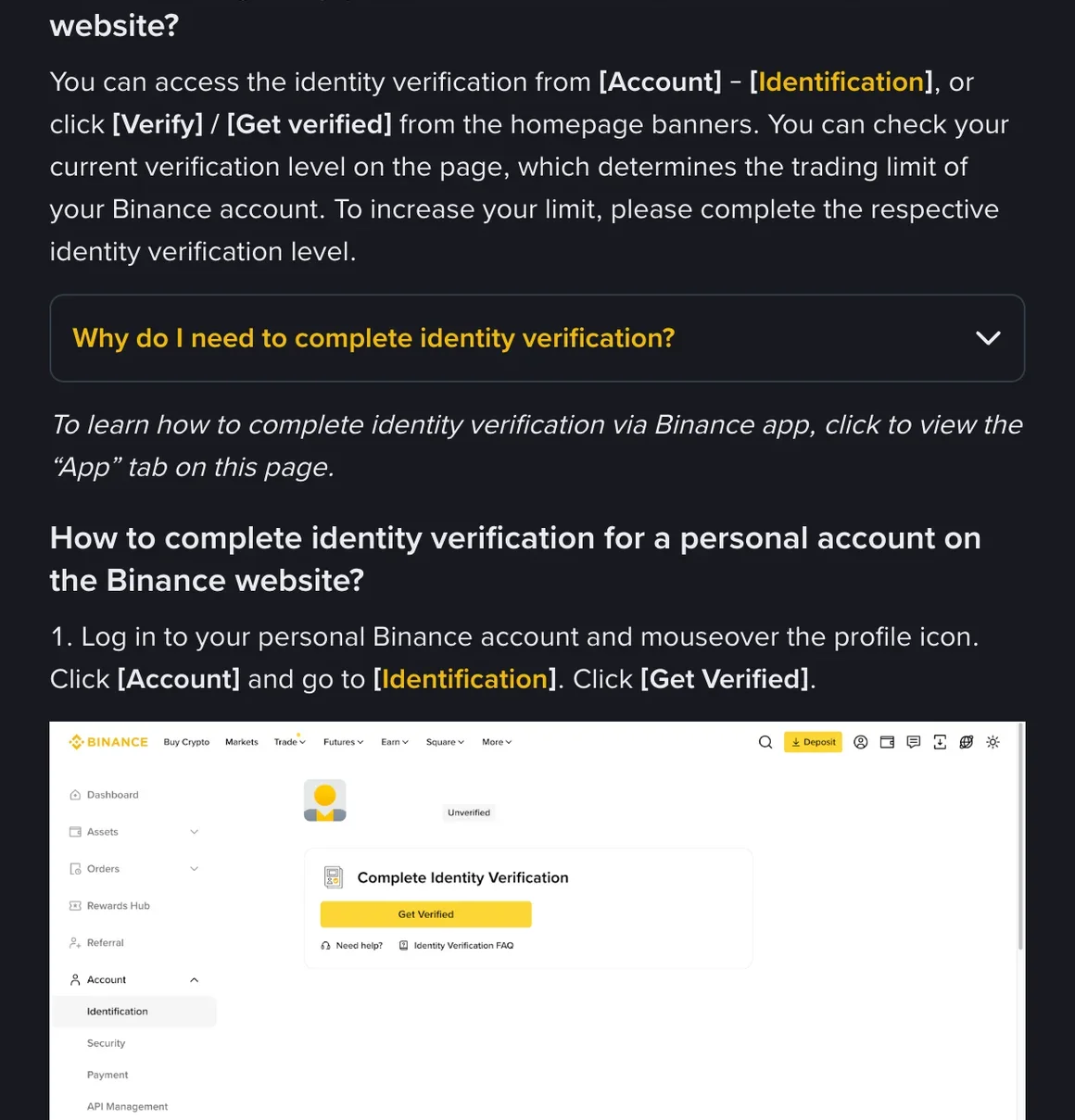
Our KYC document checker is worth running before your next attempt — it walks through country-specific document requirements and common rejection reasons so you can rule out an obvious mismatch before resubmitting.
Working through these steps in order, and fixing the specific reason each time, is the usual way past a rejection. Some cases still stall, though — a document format the system consistently misreads, a name that transliterates in a way that keeps flagging a mismatch despite correction, or an edge case Binance's automated review has not been tuned for.
When it is reasonable to stop retrying
If you have corrected the specific rejection reason at least twice, tried the alternative document where one exists, and contacted Binance support without resolution, it is reasonable to consider that this particular account, on this particular exchange, may not clear verification in the near term. Before reading on, make sure the steps above really have been worked through — they are the fix to exhaust first, and what follows is for when they genuinely have not worked.
A few situations are worth naming specifically, since they are the kind of situation that retrying tends not to fix: a document with a name that includes characters or diacritics the automated system consistently misreads, a very recently issued document that has not yet propagated into whatever reference database the verification system checks against, or a face that the liveness check struggles to match consistently to an older document photo after a significant change in appearance. None of these are common, but if one of them describes your situation, it is a reasonable signal that a different exchange's review process might handle it differently rather than a sign that verification is impossible everywhere.
Trying a second exchange: OKX
If Binance verification genuinely will not clear after a fair, corrected attempt, OKX is a reasonable second exchange to consider. It is a large, established exchange with its own P2P marketplace and broadly similar document requirements in Pakistan and Kenya, and a document that keeps failing one exchange's automated check does not always fail a different exchange's review for the same reason. This option doesn't apply to readers in India. Before signing up, check that your country isn't on the restricted list in OKX's Risk & Compliance Disclosure.
This is not a guarantee — nothing about switching exchanges promises smoother verification, and the same underlying document or name-matching issue could in principle cause problems on OKX too. It is a reasonable next step to try once Binance's own retry path is genuinely exhausted, not a shortcut around doing the KYC basics properly.
How document requirements compare
| Country | Binance primary document | OKX primary document |
|---|---|---|
| Pakistan | CNIC | CNIC (passport as an alternative on both exchanges) |
| Kenya | National ID | National ID (passport as an alternative on both exchanges) |
| India | Passport or driving licence | OKX does not serve users in India (listed in its Risk & Compliance Disclosure) |
The overlap is close enough that switching exchanges rarely means finding an entirely new document — it is more often about a different automated system reviewing the same document with a slightly different threshold for image quality or a different manual review queue behind it.
Where the two exchanges can differ more noticeably is in advanced verification tiers for higher limits, and in exactly how each handles a document with a genuinely unusual feature — heavy wear, an uncommon issuing office, or a name printed in a way that does not map cleanly to a single Roman-script spelling. Neither exchange publishes a full list of every edge case their automated systems handle differently.
Setting up OKX verification
Register with a fresh email or phone number
Use the same care choosing between email and phone as you did on Binance — whichever inbox or SIM you check most reliably.
Apply the same photo discipline that Binance's own guide covers
Flat, even lighting, a plain dark surface, all four corners visible, and a sharp preview before submitting — the same rules that help on any exchange's automated document check.
Enter your name exactly as printed on the document
Name-matching issues across transliterated scripts cause the same kind of rejection on OKX as they do on Binance — see our KYC documents guide for the detail on this specifically.
Complete the liveness check in good light
The same conditions that help a Binance liveness check pass — daylight, no glasses or face covering, following the prompt slowly — apply here as well.
If OKX verification also runs into trouble, the same general principle applies: read the specific rejection reason, fix that one thing, and don't send the unchanged photo again. Once either account is verified, our P2P basics guide covers the escrow and counterparty-selection habits worth carrying over regardless of which exchange you end up trading on.
Whichever exchange ends up working for you, the underlying habits are the same ones this whole guide keeps returning to: a clear, uncropped, well-lit photo; a name entered exactly as printed on the document; and a genuine correction between attempts rather than a resubmission of the same file.
Failed Binance KYC and switching exchanges
How many times should I retry Binance KYC before giving up?
There is no fixed number. What counts is that each attempt genuinely fixes the specific reason the previous submission was rejected, rather than sending the same photos again. If you have addressed lighting, cropping, name matching and document condition and it still fails, contacting Binance support directly is worth doing before assuming the account cannot be verified at all.
Why would OKX accept a document Binance rejected?
Different exchanges sometimes have slightly different accepted document lists, image-quality thresholds, or manual review processes, so a document that fails one exchange's automated check does not always fail another's for the same reason. That makes it a reasonable second path once you have genuinely exhausted Binance's own retry options.
Do I need a different document to sign up for OKX?
Generally no — in Pakistan and Kenya OKX accepts broadly similar document types to Binance, such as a CNIC, National ID or passport. The photo and liveness requirements are similar in spirit as well, so the same careful-photo habits that help on Binance tend to help on OKX too. Before signing up, check that your country isn't on the restricted list in OKX's Risk & Compliance Disclosure; OKX does not serve users in India.
Can I use two exchanges at the same time?
Yes, there is nothing unusual or against the rules about holding verified accounts on more than one exchange. Many traders use a second exchange specifically as a backup option or to access a slightly different set of P2P offers, independent of whether their primary account ever had a verification issue.