A missing Binance code is usually in a spam or promotions folder, blocked by a filter, or held up by weak signal or Do Not Disturb. Check them in the order below before you tap resend.
If the whole registration is failing rather than just this one code, our broader registration failed guide covers eight other causes beyond this step. If you are still early in the signup itself, the full account guide walks the entire flow from install to first trade.
This same code screen shows up more than once along the way, not just at signup — logging in from a new device, changing security settings, and confirming a withdrawal all trigger a fresh code, so the fixes below are worth remembering well past your first registration attempt.
Email codes: spam, filters, and aliases
Email is the more forgiving of the two channels, mostly because you can search for the message rather than just waiting for a notification to appear.
Search your inbox for "Binance" across every folder
Do not just glance at spam — some providers route a sender's first message to a promotions tab or a separate automated-mail folder that is easy to forget exists.
Whitelist the sender the moment you find it
Mark it "not spam" or add it to contacts. Later codes then land in the main inbox rather than repeating the same disappearing act every time.
Corporate and work email addresses are worth avoiding for this specifically. Some employers apply server-level filtering to anything mentioning crypto exchanges, and that filtering happens before the message ever reaches your inbox, so there is nothing to whitelist on your end — the message never arrives at all. A personal address removes this variable completely.
Free webmail providers behave slightly differently from each other here too. A message can be held for a few extra minutes on the first send from a new sender while the provider's own spam scoring settles, which is different from being blocked outright — refreshing the inbox after a short wait sometimes surfaces a code that a first check missed. If you use more than one email app on the same phone, check whichever one is actually linked to notifications, since a code can arrive quietly in an inbox you rarely open.
SMS codes: signal, DND, and carrier filtering
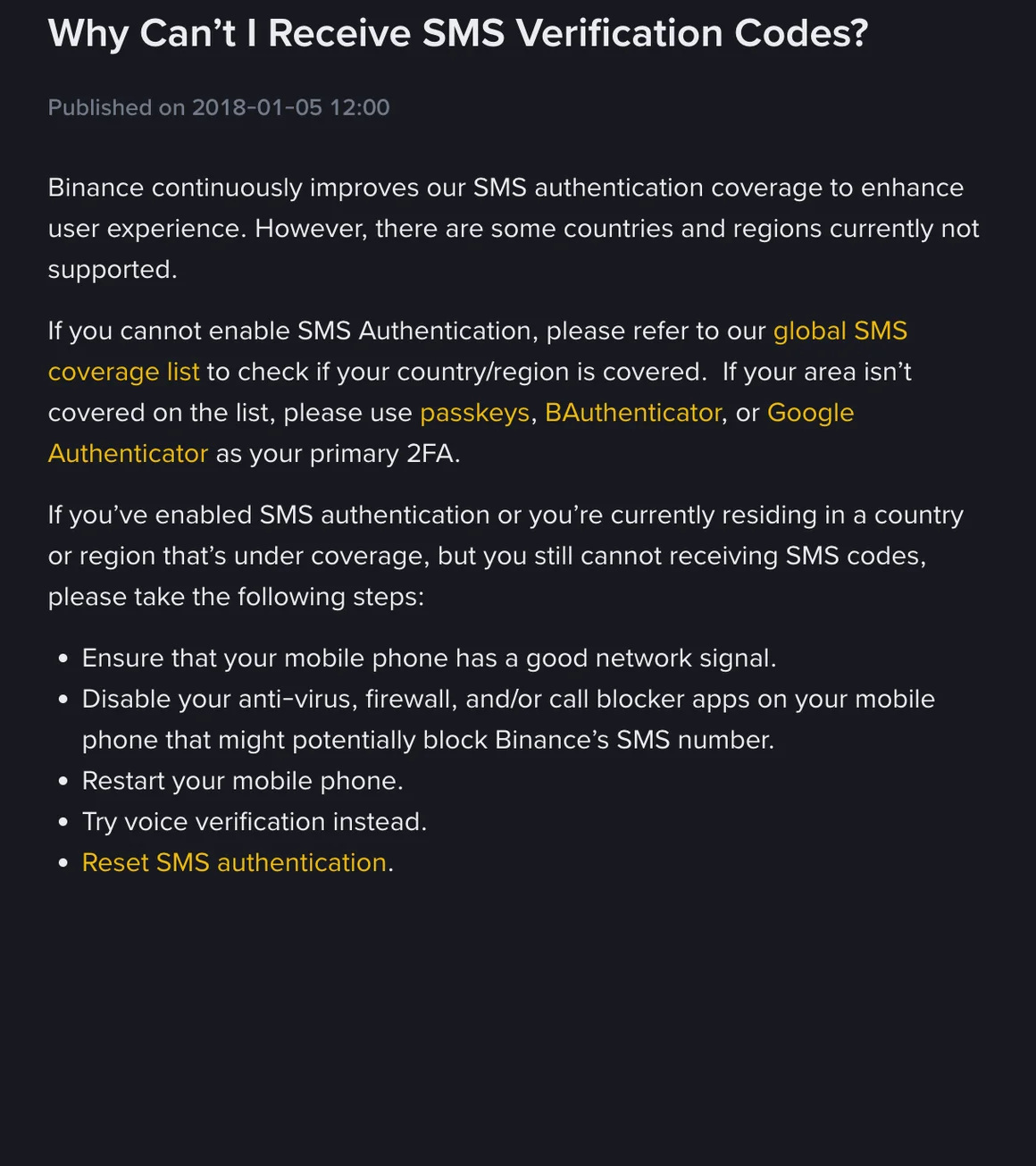
SMS delivery has more moving parts than email, and more of them are outside your control. A few checks cover most cases:
- Signal strength. A weak or fluctuating signal can delay an SMS by minutes or drop it entirely, even when calls and data both appear to work fine.
- Do Not Disturb or a similar silent mode. Some phones treat messages from unknown senders as silenced under DND, which means the code arrives but you never see the notification — check the messages app directly, not just the lock screen.
- Carrier-level filtering. Certain mobile networks in South Asia apply extra filtering to international or bulk SMS traffic, which occasionally delays a code by a minute or two even on strong signal. If a code has not landed within a couple of minutes, requesting it again is reasonable rather than assuming the number is wrong.
Being on roaming, or having recently switched SIM cards without restarting your phone, causes a similar kind of silent delay. The handset can show full signal bars while still routing messages through a stale network registration, which clears itself after a restart far more often than people expect. If a code has failed twice in a row on an otherwise normal-looking connection, restarting the phone before trying a third time is worth the thirty seconds it takes.
Why virtual and VoIP numbers cause trouble
If you registered with a virtual number, an app-based second line, or a VoIP service rather than a regular SIM, rule this out early rather than last: virtual and VoIP numbers are often blocked from receiving verification SMS. The problem does not always show at signup; it can surface on a later code instead, such as a login from a new device or a withdrawal verification.
If you suspect this is your situation, switching to a regular SIM registered in your own name resolves it more reliably than any workaround on the virtual number side. It is a small inconvenience once, rather than a recurring problem every time a code is needed.
Voice verification as a fallback
When SMS delivery is unreliable, Binance offers a voice call option on many verification screens — look for a small "call me instead" or similar link near the code entry field rather than only a resend button. A voice call reads the digits aloud rather than relying on the same SMS delivery path that already failed, so it sidesteps carrier-specific SMS filtering entirely.
If the automated call goes to voicemail before you can answer, check the screen for when you can request another call and follow what it shows. Answering promptly, even from an unfamiliar international-looking number, is the main thing that trips people up here — the call often displays as a foreign number rather than one that looks locally recognizable.
Switching channels entirely
If one channel keeps failing regardless of what you try, switching your primary verification method is a reasonable permanent fix rather than a one-time workaround. Someone whose email keeps landing in a filtered folder can add and prioritize a phone number instead, and someone whose SMS is unreliable on their network can lean on email or an authenticator app once account setup is complete.
Having both channels verified, rather than just one, also matters beyond this specific problem — it gives you (and Binance's support team) more than one route back into the account if you ever lose access to a device, which is worth setting up even after your immediate code problem is resolved.
The resend cooldown, and how to avoid triggering it
Tapping resend repeatedly within a short window triggers a temporary cooldown as an anti-abuse measure, and this catches people who are anxiously retrying every ten seconds more often than it catches anyone doing anything wrong. Once triggered, further attempts during the cooldown period tend to extend it rather than clear it faster.
The exact cooldown length is not fixed and can vary based on how many attempts were made, so treat any countdown shown on screen as the reliable figure rather than a number from any outside guide, this one included.
If you have hit the cooldown more than once in the same session, it is worth stepping away for a while rather than watching the timer. Closing and reopening the app, or coming back after finishing something else, tends to produce a cleaner attempt than sitting refreshed and anxious for the exact second the countdown ends.
The two-minute checklist
In order, before requesting another code:
| Check | Applies to |
|---|---|
| Spam, promotions, and any automated-mail folder | |
| Sender whitelisted or marked "not spam" | |
| Signal strength and Do Not Disturb mode | SMS |
| Phone number entered without a doubled country code | SMS |
| Voice call option tried once SMS has failed twice | SMS |
| Regular SIM rather than a virtual or VoIP number | SMS |
If every row checks out and the code genuinely never arrives, switching channels — email to phone or the reverse — clears this for most readers within the same session. From there, our account setup guide picks back up with the rest of registration, and our KYC documents guide covers the identity verification step that follows once the account itself exists.
Fixing the underlying cause once — a filtered inbox, a weak signal, a virtual number — saves you from repeating the same hunt every time a code is needed.
Still no Binance code? Timing, cooldowns and VoIP numbers
How long should a Binance verification code take to arrive?
If two minutes pass with nothing in your inbox or messages, work through the checks in this guide rather than requesting another one immediately.
Why do I keep getting a cooldown message when I request a new code?
Requesting several codes in quick succession triggers a short lockout as an anti-abuse measure. Wait out the cooldown shown on screen rather than repeatedly tapping resend, since each additional attempt during the cooldown can extend it.
Can I use a virtual or VoIP number to receive Binance codes?
It is not reliable. Virtual and VoIP numbers are often blocked from receiving verification SMS, and a number that got the first code can still fail on later ones. A regular SIM registered in your name causes far fewer problems at this step and at withdrawal verification later.
Should I switch from SMS to email verification if codes keep failing?
Yes, if you have ruled out signal and carrier filtering and codes still do not land. Switching the verification channel, either in the moment or as your primary method going forward, resolves this for most readers whose SMS delivery is unreliable in their area.