
When a transfer fails on the way into a trading account, people almost always blame the trading platform. Usually the block happened much earlier, inside the mobile money wallet, and it happened for a reason the wallet never explained properly: the account is registered at a tier whose ceilings the transfer did not fit under.
Your EasyPaisa, JazzCash, M-PESA or eZ Cash account has its own KYC system. It has tiers, each tier has its own ceilings on what you can send and hold, and none of it is connected in any way to identity verification on a trading platform. Two separate companies, two separate sets of documents, two separate sets of limits. Clearing one does nothing for the other.
This page is about the rail side — the part almost every crypto guide skips over on its way to talking about order books. If you have ever had a transfer bounce back for no stated reason, or arrive smaller than you sent, the explanation is far more likely to be here than anywhere on the exchange.
Your wallet has its own KYC, and nobody tells you
Mobile money grew up as a way to move small amounts of cash between people who did not have bank accounts. That origin still shapes the design. Opening a wallet can be almost frictionless — a SIM, a name, sometimes a photo of an ID at an agent counter — and the system compensates for that light onboarding by capping what a lightly verified account is allowed to do.
The result is a tier ladder. At the bottom sits an account registered with the minimum the provider will accept, with the tightest ceilings. Further up sit accounts that have submitted fuller documentation, sometimes been verified in person at an agent or a branch, and have correspondingly larger allowances. Providers use different names for these levels and different requirements to move between them, but the shape is the same everywhere the site covers.
Two things follow, and both bite regularly.
- Nobody tells you which tier you are on. Most people find out the day a transfer refuses. The tier was set when the account was opened, often years ago, at an agent counter, with whatever documents happened to be in a pocket that afternoon.
- Verifying on a trading platform does nothing here. Uploading a national ID and a selfie to an exchange does not raise a single ceiling on your wallet. They are unrelated systems that never exchange information about you. People spend real effort on the wrong side of this wall.
The upgrade path is always the provider’s own: their app, their customer care line, or an agent or branch that handles registrations. What they ask for varies — a national identity document is the usual core of it, sometimes with proof of address or a biometric check. Ask the provider what your current tier is and what the next one requires. It is a short conversation and it settles the question permanently.
What a blocked transfer actually looks like
Tier problems rarely announce themselves as tier problems. They arrive disguised as something else, which is exactly why they get misattributed to the exchange.
| What you see | What is often actually happening |
|---|---|
| The transfer is refused outright, with a generic error code | The amount was over the per-transaction ceiling for your tier, or over whatever was left of the daily one |
| The app will not accept the figure you typed, or quietly caps it | The entry field is enforcing a ceiling before the transfer is even attempted |
| The account is restricted or frozen for review | An automated check flagged a pattern — an unusual size, an unusual burst of activity, or a sequence that looks like a limit being worked around |
| Part of the money arrives and part does not | The transfer was split, by you or by a retry, and only some of the legs cleared |
| The money leaves but takes far longer than usual to appear | A pending state on the provider’s side, which is not the same thing as a completed transfer |
That last row causes more trouble in P2P trades than any of the others, because a seller looking at a notification and a seller looking at available funds are looking at two different facts. It has its own page: whether a mobile money payment can be reversed after you release.
None of these arrive with a message saying your tier is too low. You get a code, or nothing at all. The only reliable way to separate a tier ceiling from a genuine outage is to ask the provider — which is why the first move after a failed transfer is the provider’s support channel, not a forum thread.
Three ceilings, not one
People talk about their limit as though it were a single number. There are usually at least three, they are enforced independently of each other, and the one that stops you is reliably the one you were not watching.
| Ceiling | What it caps | How it catches people |
|---|---|---|
| Per transaction | The largest single transfer allowed | The easiest one to plan around, because it refuses immediately, at the moment you enter the amount |
| Daily | Everything you move in a day, added together | The classic trap. Four transfers go through, the fifth fails, and nothing about the fifth was different |
| Monthly volume, or a balance cap | Total movement over a longer window, or the most the wallet is allowed to hold at once | Invisible for weeks, then it stops something in the month you happen to be moving more than usual |
Balance caps deserve their own mention because they fail in the opposite direction. Sending out is fine; receiving is refused, because accepting the money would push the wallet past what your tier may hold. Someone cashing out into a wallet that is already close to its ceiling can watch a payment bounce for reasons that have nothing to do with the sender.
Then there is the ceiling nobody publishes: the provider’s own risk screening. It is not a number you can look up, and it reacts to patterns rather than to amounts — a quiet account that suddenly gets busy, a run of transfers to unfamiliar recipients, a first large transfer after years of small ones. This is why a large transfer from a rarely used account behaves differently from the identical amount sent by somebody who moves that much every week.
Charges step, they do not scale
Mobile money charges are almost never a flat percentage. They are banded. A range of amounts costs one fixed charge, the next range costs a different one, and the jump between bands happens at a specific figure. Send a little more and the charge can move up a step.
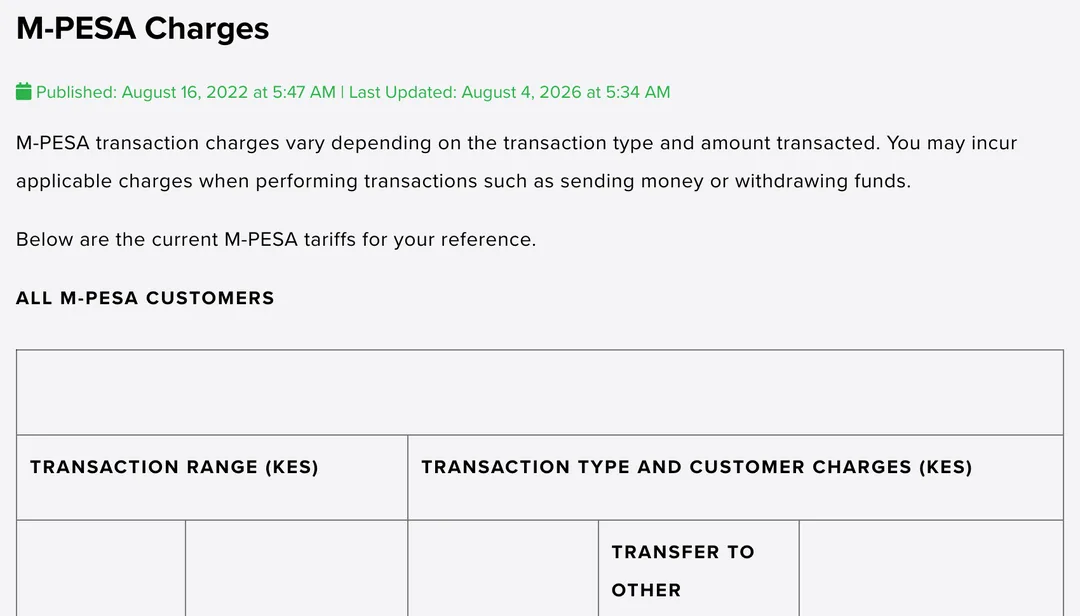
The structure in that screenshot is the thing to look at rather than any individual figure. A left-hand column sets out transaction ranges, and the columns beside it give the charge for each type of transaction within that range. One row covers a band of amounts. Cross into the next band and you are on a different row with a different charge, regardless of how small the step across the boundary was.
Two consequences follow, and they run in opposite directions.
- Splitting a payment does not reliably make it cheaper. Two transfers pay two charges. Depending which bands they land in, the total can come out above a single transfer or below it. That is arithmetic against a specific table, not a rule of thumb you can carry between providers or between months.
- Amounts sitting just above a band boundary are the expensive ones. A figure a little over the line pays the higher band for the whole transfer. Where those lines fall is knowable, but only from your own provider’s current table.
Which is the whole point of this section. Read your own provider’s published tariff. Not a number from an article, not what a merchant told you, not what the charge was last year. Providers publish these tables on their own sites, revise them, and date them — the page above carries a published and last updated line for exactly that reason, and a table without a date on it is not worth planning around.
Charges also vary by transaction type, which is what those separate columns are for. Sending to a registered user, sending to somebody not registered on the network, withdrawing cash at an agent, and paying a business can each sit under a different column of the same table at the same amount. Reading across the wrong column is an easy way to be surprised.
One more asymmetry worth expecting: a transfer between a wallet and a bank account may be priced by whichever side initiates it, and the two directions are not always charged the same way.
Why three names have to agree
The name on your wallet, the name on your bank account and the name on your trading profile should all be the same name. When they are not, the failures are slower and more expensive than a rejected transfer, because they surface after the money has already moved.
Everyone in the chain checks independently, and none of them can see each other’s checks. The provider matches the registered wallet owner against the documents it holds. A bank matches the account holder. A trading counterparty matches the sender name against the person on the order, and refuses or disputes when it does not line up. Any one of those checks can stop things, and each of them is looking at a different record.
Almost all mismatches are mundane rather than suspicious:
- Spelling variants of the same name across documents — Muhammad and Mohammad, and equivalents in every language the region uses.
- Initials expanded on a national ID but abbreviated at wallet registration, which is routine for Tamil and Sinhala names in particular.
- A maiden name on one record and a married name on another.
- Transliterations from Urdu, Bangla, Sinhala or Tamil into Latin script that were done differently by different clerks on different days.
- A household wallet registered to one family member while somebody else in the house actually uses it.
- A small business account holding the working float, used to pay for something personal.
The household and business cases are the ones worth pausing on, because the money genuinely is yours to send and it still fails the check. From the receiving end there is no way to distinguish a family wallet from an account that has been taken over. Nobody is accusing you of anything; the record simply does not support the claim, and unverifiable claims get set aside. Our page on how escrow works and how disputes are decided goes into what that looks like when it lands in an appeal.
All of it is fixable, and the time to fix it is now rather than mid-transfer. Ask the provider to correct or update the registered name where it is wrong, and make sure the identity document you verified with elsewhere carries the same spelling. It is paperwork, it is dull, and it removes an entire category of problem permanently.
Before a large first transfer
If you are about to move noticeably more than you usually do, a few minutes of checking beforehand is worth more than any amount of troubleshooting afterwards.
Find out which tier you are actually on
Ask the provider, or check the limits screen in the app if it has one. Guessing is not the same as knowing, and the answer usually takes one short call or one visit to an agent.
Read the current tariff table on the provider’s own site
Find where the band boundaries sit around the amount you intend to send, and check you are reading the column for the transaction type you are actually doing.
Count the daily ceiling against everything else you will send today
Not just this one transfer. The daily figure counts every transfer added together, including the ones you already made this morning and forgot about.
Check the receiving side too
If money is coming back into the wallet, a balance cap can refuse it on arrival. The ceiling that stops you is not always on the sending end.
Confirm the names line up
Wallet, bank account and trading profile all carrying the same name, spelled the same way. This is the cheapest check on the list and the one that prevents the most expensive failure.
Send a small transfer first, then the rest
A small transfer that arrives cleanly tells you the route works, the names pass and the charge matches what you calculated. The test costs you one small charge. Skipping it can cost you a large amount stuck somewhere with a support ticket attached.
What this page leaves out
Stated plainly, so you know where the edges are.
- No figures. There are no limits, charges, tier thresholds or percentages anywhere on this page, and that is deliberate. They differ by provider, by country and by tier, and they get revised. Any number here would be wrong for most readers and stale for the rest. Your provider’s published table is the answer.
- Nothing about legality. Rules on crypto differ sharply across Pakistan, Bangladesh, Kenya, Sri Lanka and India. We keep separate pages for that rather than handling it in passing — the legal picture in Pakistan, in Bangladesh, in Kenya, and in Sri Lanka.
- No workarounds. If a limit, a service or an account type is not open to you, this page has nothing on getting around it and will not suggest anything. The route through a low tier is upgrading it with the provider.
- No tax. Not covered here, anywhere.
- No provider comparison. Nothing here rates one wallet against another or recommends where to hold money.
Crypto assets are volatile and can lose value. Nothing on this page is financial or legal advice.
The short version: your wallet has a tier you probably do not know, that tier sets several ceilings that are enforced separately, the charges attached to it move in steps rather than smoothly, and the name on the account has to match the names everywhere else. Four things, all knowable in an afternoon, and between them they explain most of the transfers that fail on the way into a trade.
Questions people ask
Why was my transfer rejected when there was enough money in the wallet?
Balance is only one of the conditions. A mobile money transfer also has to fit under a per-transaction ceiling, under whatever is left of a daily ceiling, and sometimes under a monthly one — and the tier your wallet is registered at sets all of them. A wallet opened quickly with minimal documents sits at a low tier by default, so a well funded account can still refuse a transfer that is simply too large for its tier.
Is my wallet tier the same thing as verification on a trading platform?
No, and this confusion costs people more time than any other. They are two separate systems, run by two separate companies, that do not talk to each other. Clearing identity checks on a trading platform does not raise a single ceiling on your mobile wallet, and upgrading your wallet changes nothing about your trading account.
Should I split a large payment into smaller ones?
Sometimes splitting is the only way to fit under a per-transaction ceiling, but treat the cost as an open question rather than an assumption. Charges are usually banded, so two transfers can come to more than one, or to less, depending on which bands the amounts land in. Work it out against your own provider’s published tariff first. Habitually slicing payments to sit under a threshold is also the kind of pattern that attracts a review, which is the opposite of what you want.
Where do I find my actual limits and charges?
Your provider publishes them, and that published table is the only source worth trusting. Look for a tariff or charges page on the provider’s own website, or the limits screen inside the app. Figures quoted in articles, forums and group chats go stale quickly and are often for a different tier or a different country than yours.
The money left my wallet but never arrived. What now?
Start with the provider rather than the trading platform, because the transaction lives on the provider’s ledger. Find it in your app, keep the reference code, and raise it through the provider’s support channel. If it was part of a P2P order, say so inside that order as well and leave the order open — closing it removes the record everyone would need later.
Why does the name on my wallet have to match my other accounts?
Because every party in the chain checks it independently. The provider checks the registered owner against the documents on file, a bank checks the account holder, and a trading counterparty checks that the sender name matches the person on the order. A mismatch anywhere along that chain is what gets payments held, refused or disputed afterwards, even when the money genuinely was yours.